I'm hardly an expert on this, but I do have a few tips and advice for those starting out or in need of assistance. These are, obviously, only my opinion. There is no 'right' way to blog - nor is there a 'wrong' way. Besides, you put ten different bloggers in a room and ask for advice, you'll get fifteen different opinions. ;)
Be Yourself: This may sound like advice your parents would give you, but I think that genuine people are just so much better to hang around. It might take you awhile to find who you are when you blog (it took me over a year) but don't try to be someone else. You are you and you have a unique way of looking at the world. Don't try to stifle it to be more like someone else.
Leave Links: Personally, I don't spend much time at blogs that refuse to leave links to the book they're talking about. Yeah, it's a little more work, but I grantee there will be readers out there that appreciate an easy way to find the book you're talking about.
Be Careful With Your Colors: I have vision problems and there is nothing worse than trying to read white letters on a dark background. Bright colors will also cause problems for some people. I'd also suggest avoiding colors that clash or just too much color in general - but the latter is more personal preference.
Develop A Schedule: It's okay to deviate from it, but if you have a way that you can keep track of what you want to post and what you've already posted, there's a good chance you'll find it easier to post what you want when you want. Also, don't be afraid of 'stockpiling' posts. If you feel really creative today, go ahead and work on a post you won't have to post for weeks and save it.
Use Templates: I have a post titled 'Mis' that I have saved on my blogger that I will never post. On it I have the url to all those little banners you see at the top of my posts, as well as the header for my Top Ten Tuesday posts and a template for my book reviews that just has to be filled in with the information specific to that book. Because I now have everything in one place, it has made getting posts together a lot easier.
Interact: I'm much more likely to be a repeat visitor to your blog if you reply to comments. (It's also great when you take the time to visit the commenters blog!) I started blogging both to talk about books and to interact. I love getting to talk to people and make new friends and have conversations about books. I really think this is something good to encourage more people to visit you - and I personally find it rewarding. Of course, I totally understand how sometimes you just don't want to or have the energy for it. But if you make the effort, I almost guarantee you'll get more commenters/readers. (Also, consider using something like intensedebate or disquis if you don't already, so that you're comments aren't just floating around in cyber-space but actually get to the commenter.)
So, there we have six tips that I personally have found useful. Of course, everyone has their own opinion as to what makes a good blog, so whether you follow all of these, some of them, or none, I hope you have fun blogging!

Showing posts with label How To. Show all posts
Showing posts with label How To. Show all posts
Monday, April 11, 2016

Monday, November 9, 2015
How To Get The Most Out Of Goodreads: Exclusive Shelves
I love using Goodreads. I know, there have been a lot of issues that have cropped up even of the few years that I've been a member - but I've yet to find a website that works so well for me. I use Goodreads more as a way to find books to read than as a social platform and I think it works wonderfully as that. (Because as a social platform, I'm either doing it wrong, or it's awful.)
Bookshelves
I think my favorite thing about Goodreads is the way you can use their 'bookshelves' option. Now, I'll admit, it took me a distressing amount of time to truly figure this out. Ever since I first joined, I've organized books by shelves. Usually by genre. That worked out fine until I created a little thing called a tbr-jar shelf. I didn't want those books mixed up with my 'to-buy' books, so I had to create another shelf. Then my shelves got even messier. Then I discovered a wonderful little thing called 'exclusive shelves'.
Exclusive Shelves
Basically, what this means is that a book can only be on one exclusive shelf. When you first join Goodreads, you have three exclusive shelves. 'Read' 'Currently Reading' and 'To Read'. Any book you add has to be on one and only one of those shelves. However, you can add exclusive shelves.
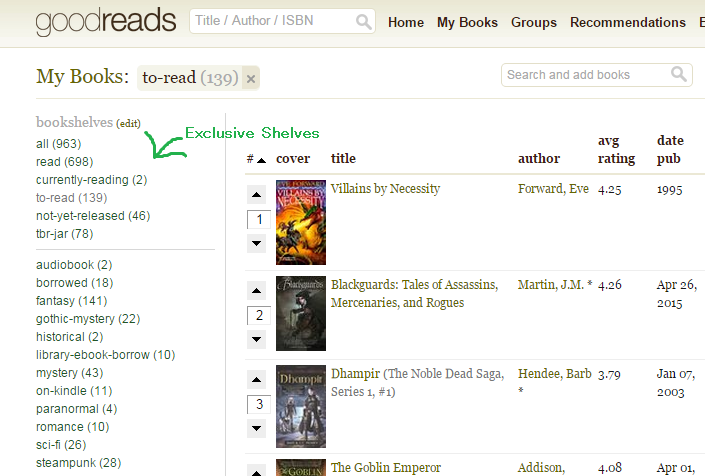
To add an exclusive shelf, all you need to do is click on the 'edit' next to 'bookshelves' (up there by the top edge of my arrow). From that page you can create new shelves and make any of them exclusive.
This has helped me organize my books so much and hopefully you'll find it useful too. If there's anything you'd like to learn how to do on Goodreads, leave me a comment and I'll see if I can help you out.
Subscribe to:
Posts (Atom)